Watch the following lecture:
Mon 10/3 Human potential, the self, self-actualization
It's 49 minutes and 11 seconds.
Take notes using the outline method and hand them on on Monday.
This assignment is worth 50 points.
Thursday, February 15, 2007


Tuesday, February 06, 2007
1140 Lab Assignment T 2/6
Go to this website:
http://webcast.berkeley.edu/course_details.php?seriesid=1906978398
and watch the lecture:
Mon 1/22 Nutrient Needs
Take notes. When you finish, write a list of 10 test questions based on the lecture.
You will give this test to your group members tomorrow.
http://webcast.berkeley.edu/course_details.php?seriesid=1906978398
and watch the lecture:
Mon 1/22 Nutrient Needs
Take notes. When you finish, write a list of 10 test questions based on the lecture.
You will give this test to your group members tomorrow.
Monday, January 22, 2007
Presentation Tips
Presentation Tips
ELI 1140--
Visit the following website for tips on presentations:
http://arc.academyart.edu/esl/whatmakesgood.asp
ELI 1140--
Visit the following website for tips on presentations:
http://arc.academyart.edu/esl/whatmakesgood.asp
Thursday, January 18, 2007
1140 Presentation Assignment
What it Takes to Succeed in College
Overview
This webquest will help you be better-prepared for life in an American university. This activity is geared towards entering freshmen in Arkansas Tech’s English Language Institute, with an intermediate level of English.
In the classroom, students will need to use the computer and projector as visual aids when presenting their findings.
Introduction
Welcome to Arkansas Tech! I know that in many of your home countries, college is the time to take it easy and relax after studying hard for years and years.
However, while it is easier to enter university in America, it is much more difficult to finish with a Bachelor’s degree. In fact, most entering freshmen never graduate with a degree because they are not prepared for the challenges that being a college student presents.
You will not be a statistic! Being successful in American universities depends on many factors. These topics, which we will explore, include:
- Time management
- Critical thinking
- Note-taking skills
- Test-taking skills
Questions and the Task
Following are Web sites that provide information on many aspects of succeeding in college. Before you begin, however, check your understanding of essential vocabulary by going to this Web site:
http://www.college.hmco.com/esl/
Time Management
http://www.dartmouth.edu/
http://www.dartmouth.edu/
http://www.ecampustours.com/
http://home.okstate.edu/
What are some important ways of managing your time? Which techniques do you find most useful? How can you deal with school pressure? How can you balance your studies and extracurricular activities?
Critical Thinking
http://www.academictips.org/
http://www.westwords.com/
http://www.utoronto.ca/writing/
What is “Critical thinking?” Why is it important? How can you read critically? How can thinking critically help you to do better in college?
Note-taking skills
http://www.dartmouth.edu/
http://www.d.umn.edu/
http://www.glencoe.com/
http://www.cityu.edu.hk/
How can students take good notes? What is the purpose of taking notes? What are the most commonly used note taking strategies? Which strategies are best for international students?
Test-taking skills
http://www.d.umn.edu/
http://www.southwestern.edu/
http://www.testtakingtips.com/
What are the best ways to prepare for a test? What strategies can you use during the test? How about after you finish the test? Are note-taking skills, critical thinking, and time management important parts of preparing for a test? Which test-taking skills will you use in the future?
Process
Each group member must research the skills outlined in your role description. Use the Web sites above and try to find other Web sites that relate to your topic.
Keep in mind that you will give a group presentation, and some of your information will overlap. You must give a PowerPoint presentation, summarizing what you discovered as a group, and you must each write a two-page essay summarizing what you learned in your role (in other words, group presentation and individual paper).
Go here to see how you will be graded on your presentations:
http://www.ncsu.edu/midlink/rub.pres.html
Wednesday, December 20, 2006
To access the pronunciation program in Rosetta Stone:

1.Login to Rosetta Stone
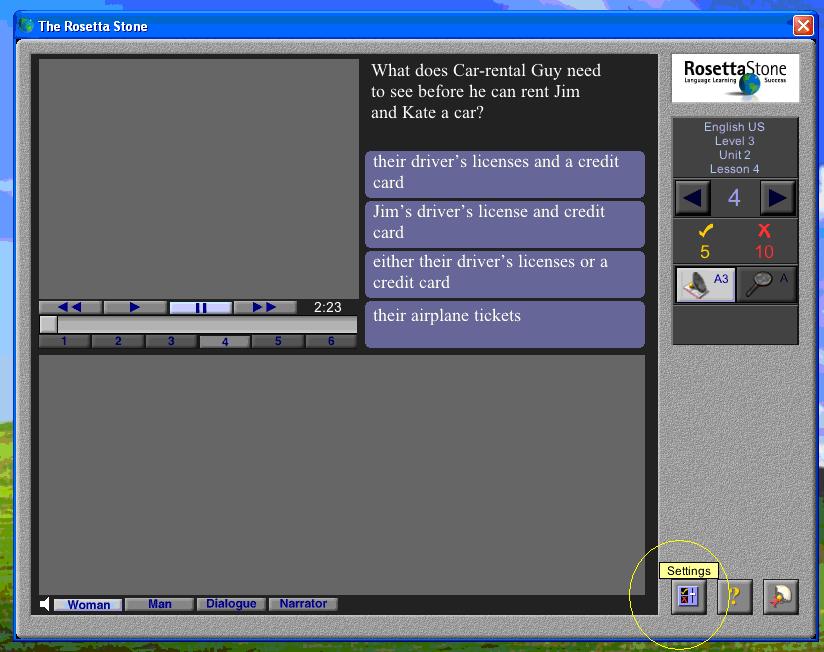
2.Click the “Settings” button (to the left of the “?” button)
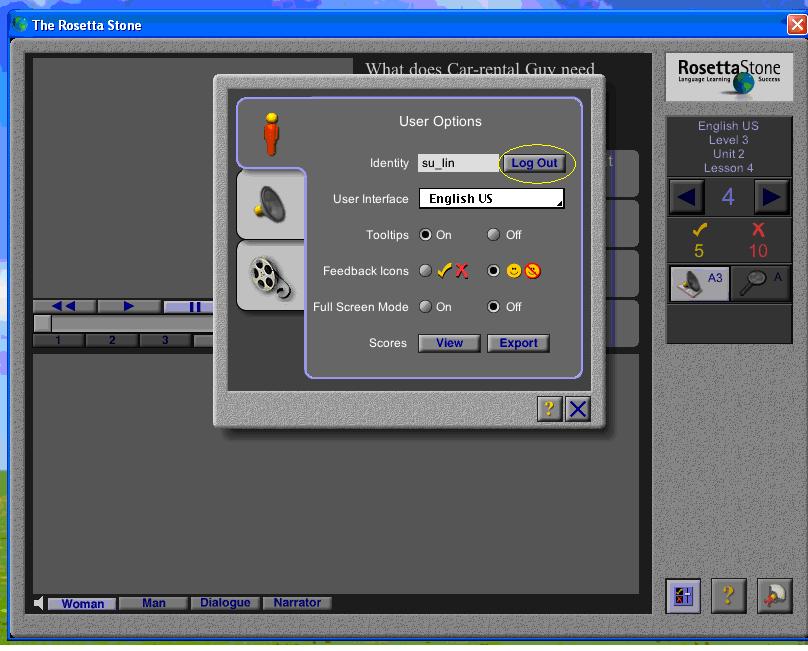
3.Click “Log Out.”
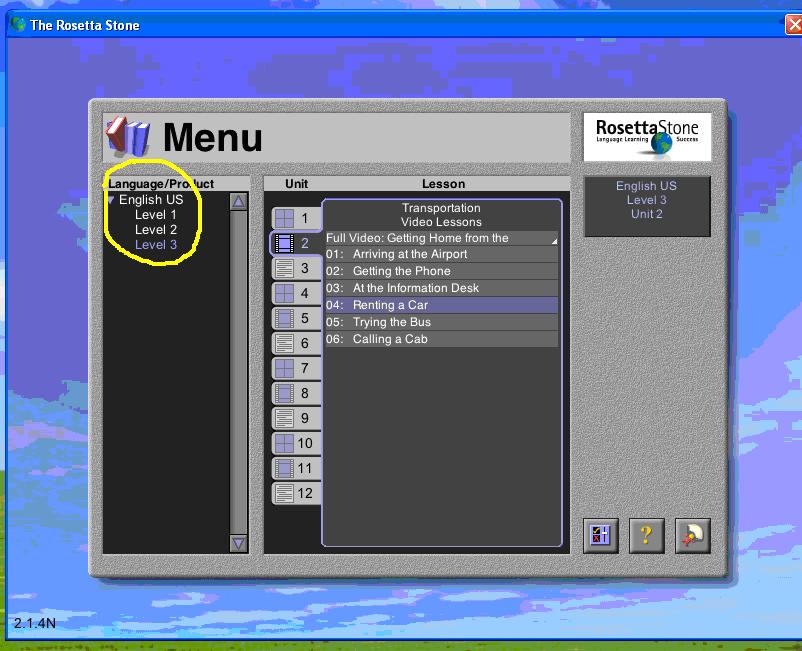
4.Choose a Level under “English US” example: Level 1, Level 2, or Level 3

5.Choose a Unit and Lesson from the menu on the right.
For Example:
Level 1->Unit 2->Lesson 01: “More Verbs: Present Progressive”
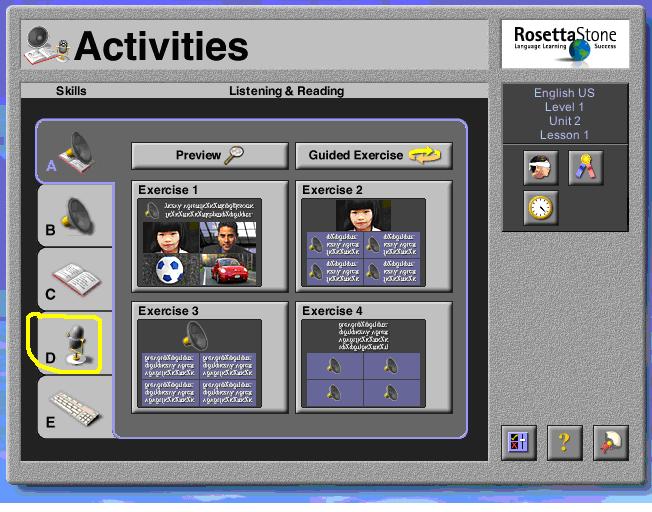
6.Click letter “D” (the picture of the microphone)
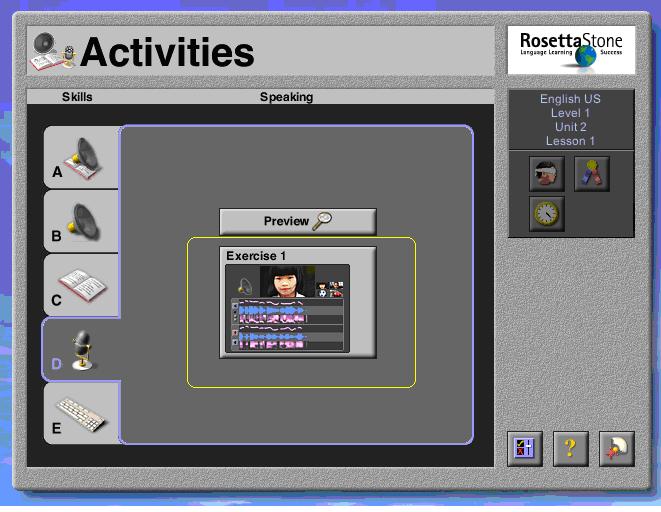
7.Click the square to the right-- example: “Exercise 1”
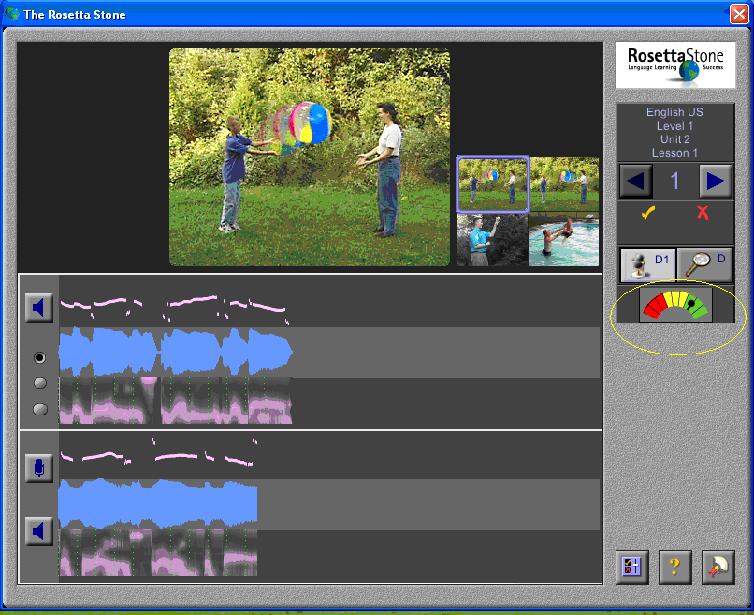
8.Listen and repeat. Be sure your microphone is working! Green is excellent, yellow is ok, red is poor.
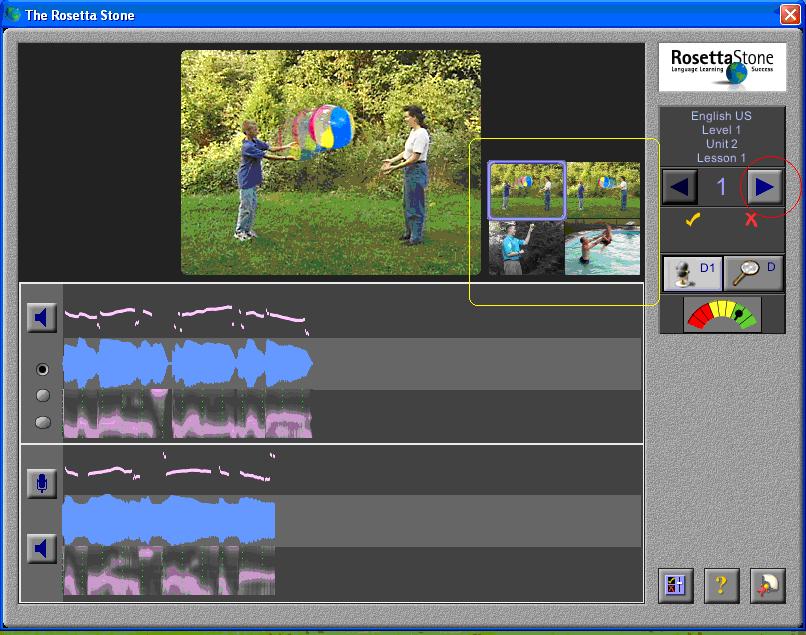
9.Finally, click on each picture (there are four). When you finish, click the arrow.
Wednesday, July 05, 2006
How to Record in PowerPoint
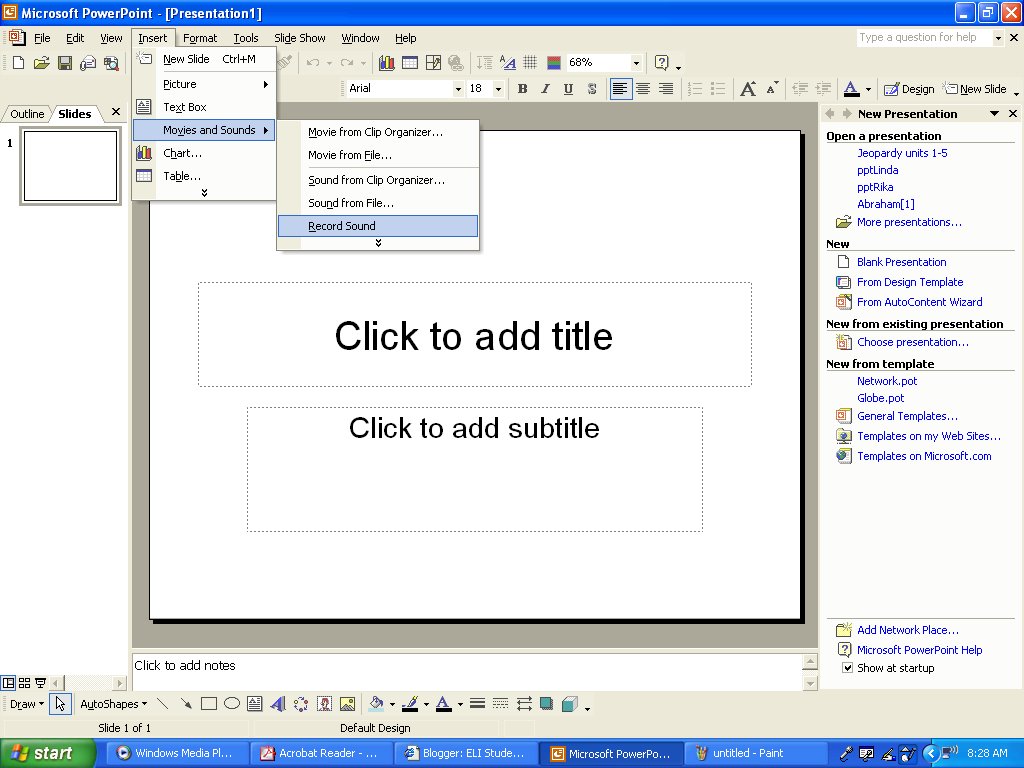
Step 1: Click on "Insert-->Movies and Sounds-->Record Sound" Make sure your microphone is plugged in.
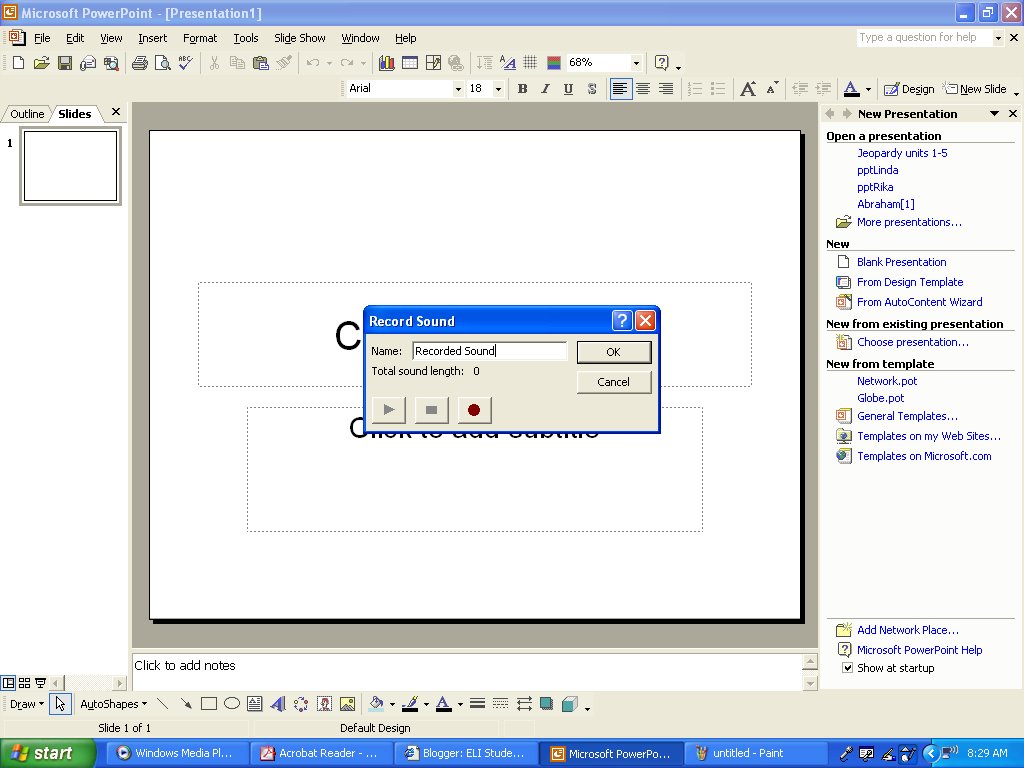
Step 2: The "Record Sound" window will appear. Click the red button to begin recording.
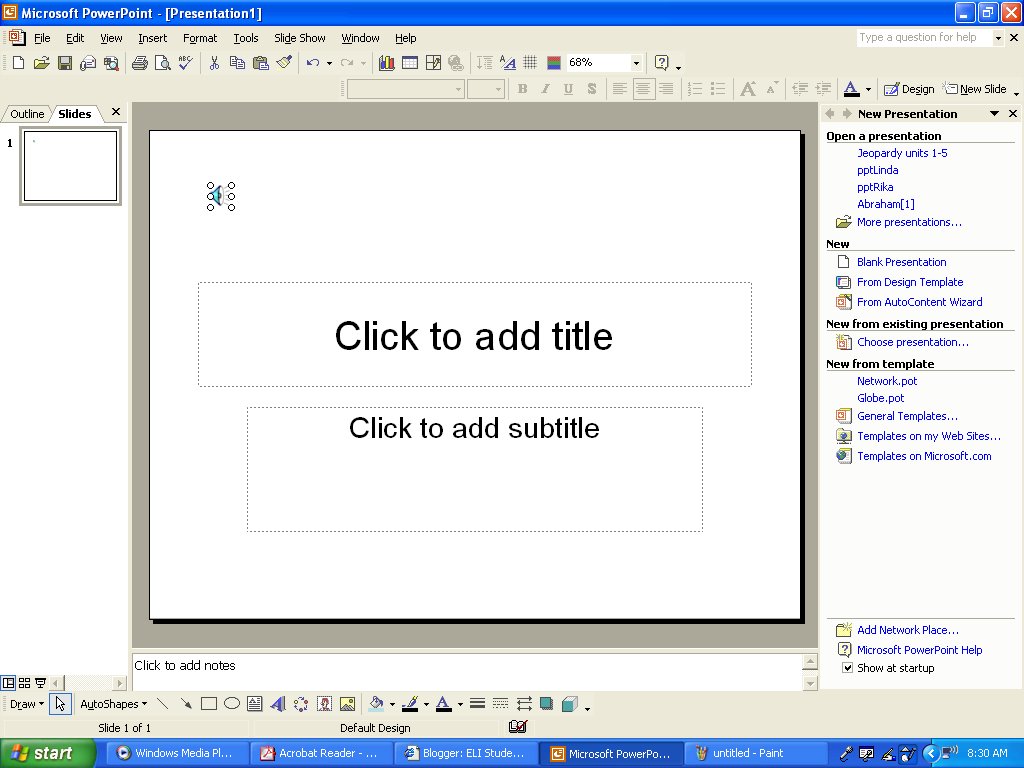
Step 3: When you finish recording, press the stop button. A speaker icon will appear.
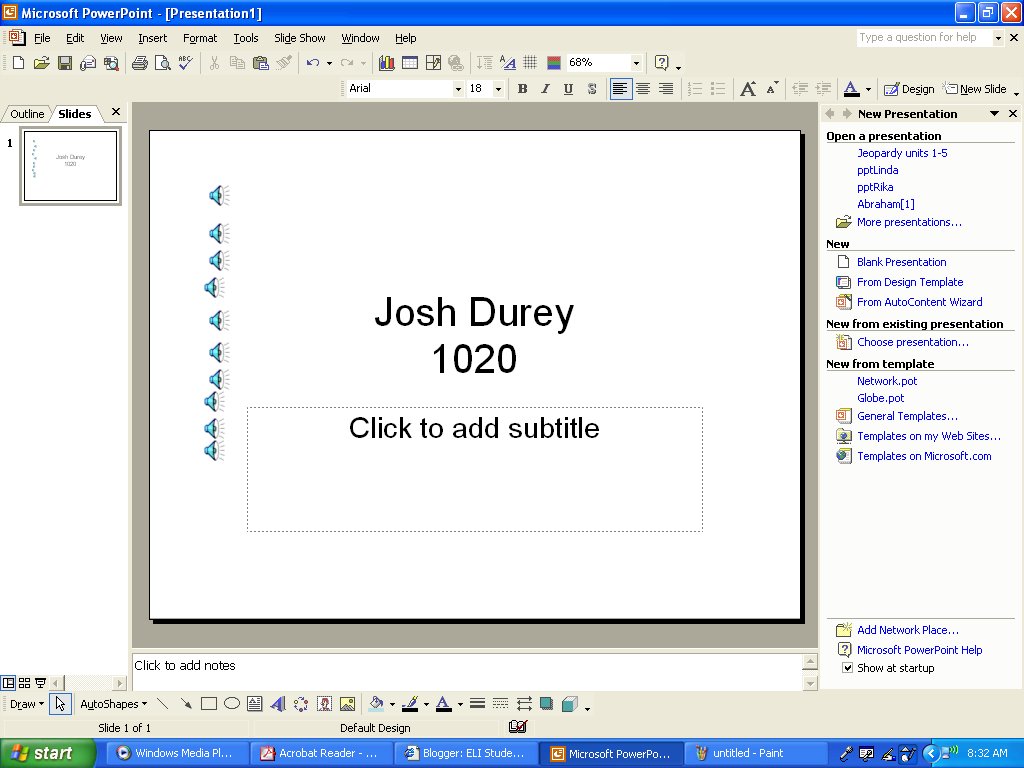
Step 4: Repeat Steps 1-3 for each sentence you record. When you've finished recording, write your name and class on the slide.
Finally, save the PowerPoint file and email it as an attachment.
Monday, June 26, 2006
Plagiarism Assignment
Go to the following website:
http://library.acadiau.ca/tutorials/plagiarism/
Go through the tutorial and post what you learned on your blog.
http://library.acadiau.ca/tutorials/plagiarism/
Go through the tutorial and post what you learned on your blog.
Friday, June 23, 2006
Adding Links to Your Blog
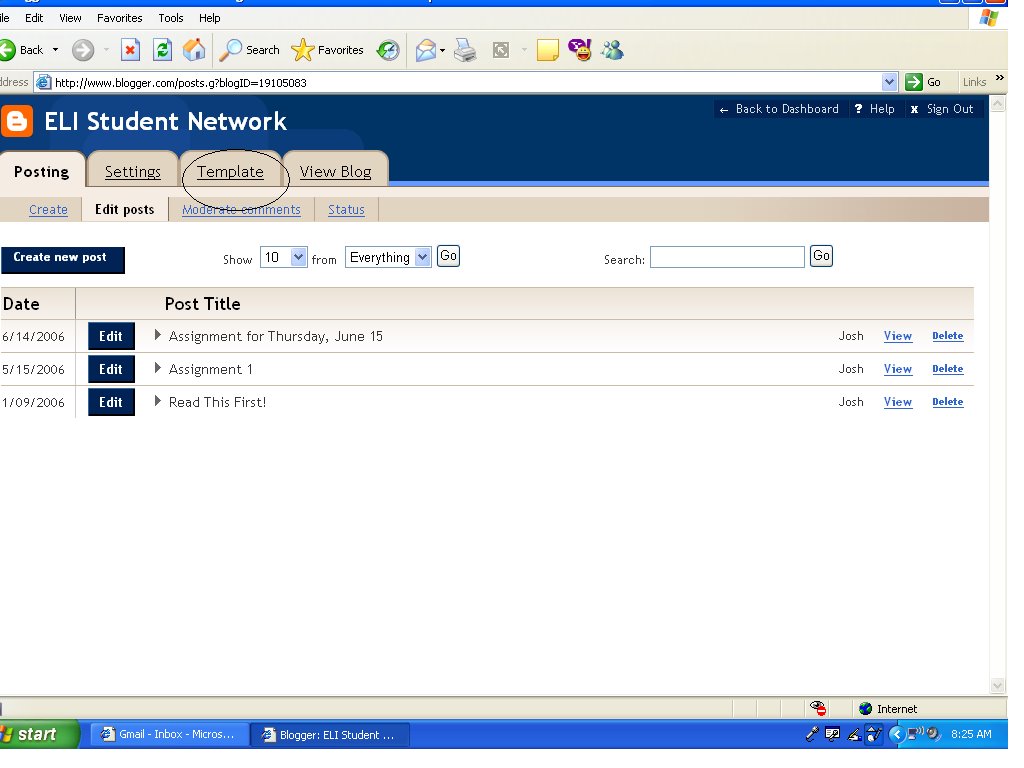
Step 1: After logging in, click on "Template." This will take you to the template page, where you can edit the look of your blog.
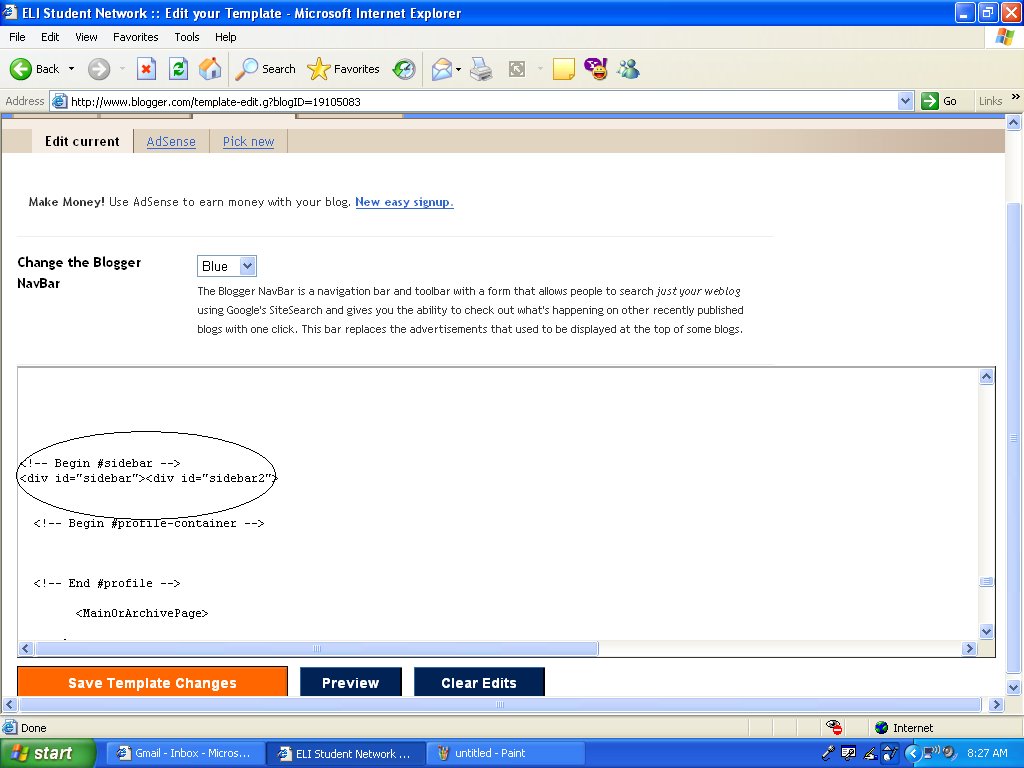
Step 2: Scroll down until you see "Begin Sidebar." You should see a section for links, which will say "Google News" and "Edit me!"
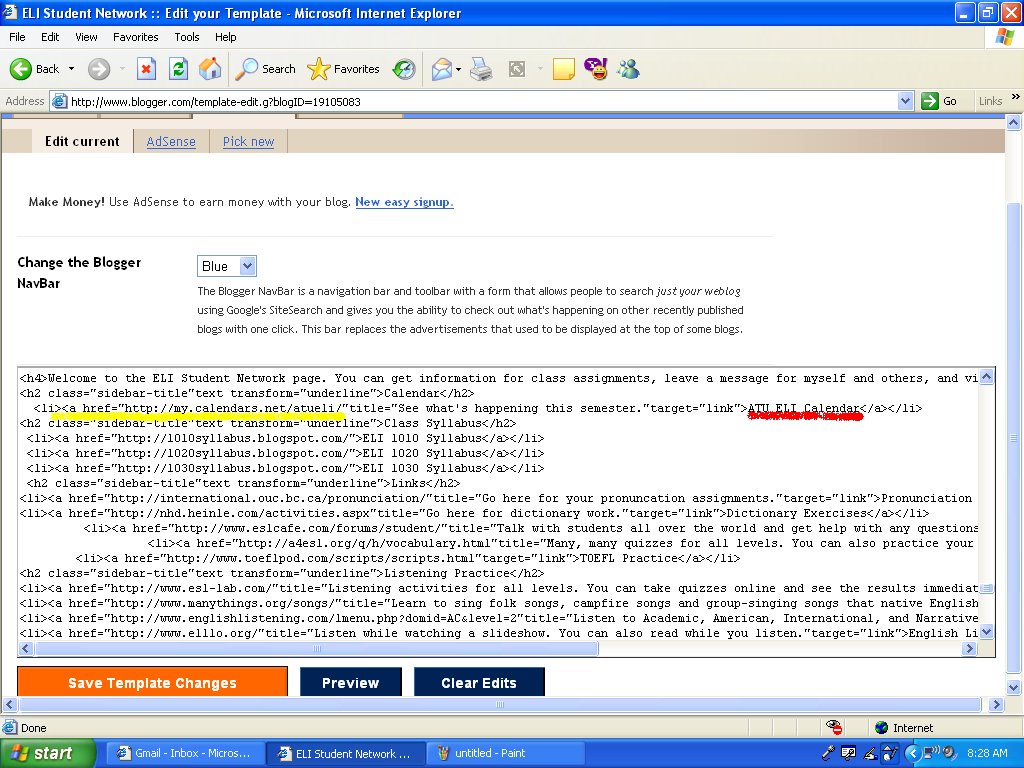
Step 3: Insert the http:// address of the website you want to link to. Then give your link a title by typing it between ">" and "< /a >"
For example,
< a href="http://eslcafe.com">ESL Cafe < /a >
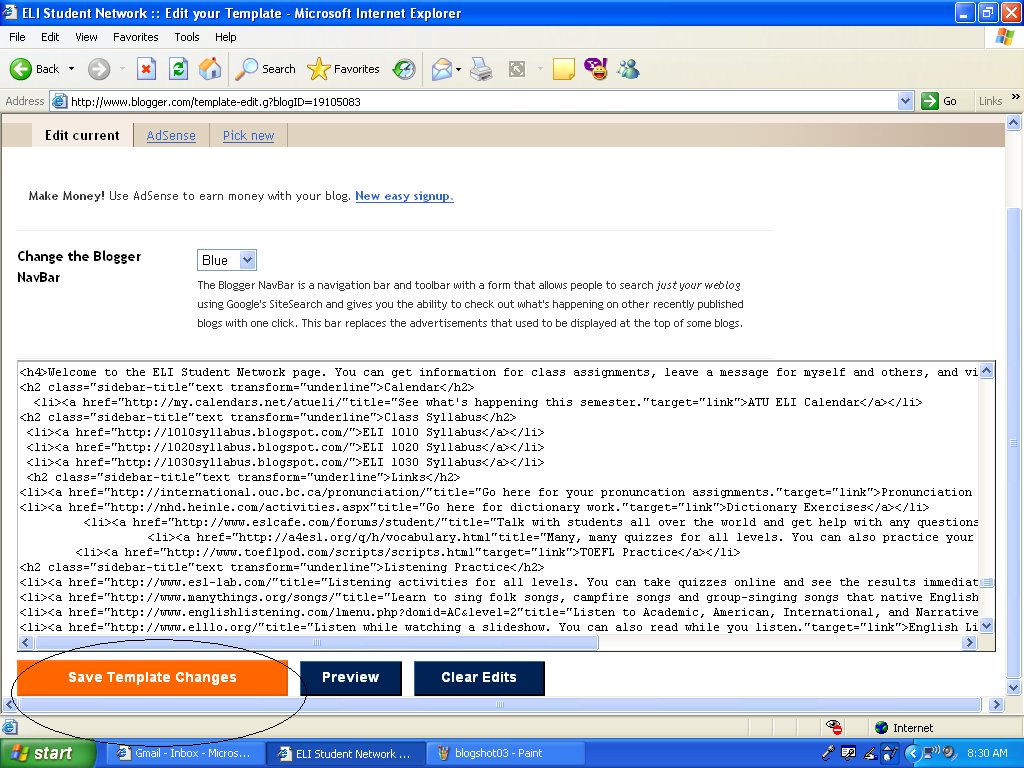
Step 4: Click on "Save Template Changes."
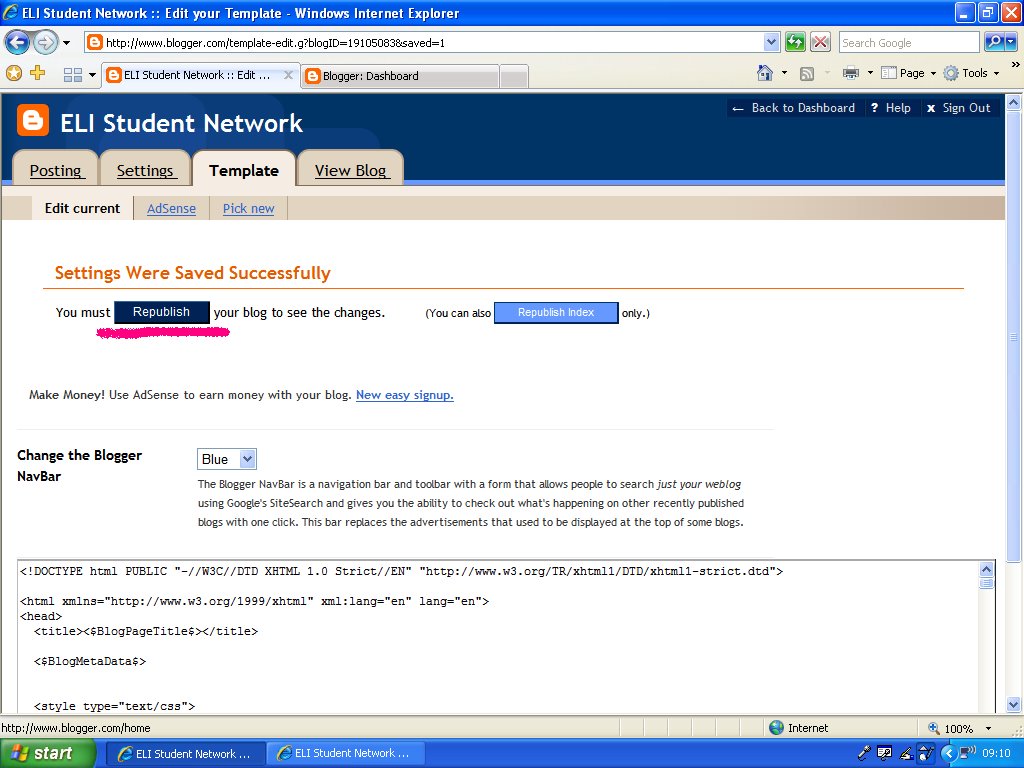
Finally: click the "Republish" button. You have now added links to your blog!
Monday, January 09, 2006
Read This First!
Hello!
The purpose of this blog is so my students can come and check their assignments and ask questions to myself or other students.
You will be required to create your own blog.
You will need to create an account first. To do so, go here:
http://www.blogger.com/signup.g
and fill out the form. Then when you post comments your name will be displayed.
Each week, you will need to update your blog. We'll talk about ideas in class, and you can come to this site if you're not sure what to do.
If you have questions or problems, leave a comment on this website.
Thanks,
Josh
The purpose of this blog is so my students can come and check their assignments and ask questions to myself or other students.
You will be required to create your own blog.
You will need to create an account first. To do so, go here:
http://www.blogger.com/signup.g
and fill out the form. Then when you post comments your name will be displayed.
Each week, you will need to update your blog. We'll talk about ideas in class, and you can come to this site if you're not sure what to do.
If you have questions or problems, leave a comment on this website.
Thanks,
Josh
Subscribe to:
Posts (Atom)